

Samsung Washer Repair in Milpitas, CA
Milpitas-area homes face particular stress on washing machines due to the region's moderately hard water supply, which can cause mineral buildup and reduce appliance efficiency over time. When a Samsung washer malfunctions, Milpitas Appliance Repair Pros connects you with independent local repair providers who can diagnose and resolve the issue quickly, helping you avoid prolonged downtime and further damage to your machine.
Samsung Washer Repair for Milpitas Homes
Homeowners throughout Milpitas rely on washing machines to handle daily laundry, and Samsung washers are a common choice in local homes. The South Bay's moderately hard water—a blend of groundwater and imported surface water—can accelerate mineral buildup inside appliances over time, while periodic winter storms and occasional power fluctuations add stress to electrical components and water valves. These conditions mean Samsung washers in Milpitas often face premature wear on drum seals, pump systems, and control boards. When a Samsung washer starts leaking, fails to drain, or won't complete a cycle, fast, reliable repair becomes essential to avoid water damage and restore peace of mind.
Milpitas Appliance Repair Pros connects property owners with independent local repair providers who specialize in Samsung Washer Repair and understand how regional water quality and seasonal weather affect appliance longevity. Each provider performs a thorough diagnosis, addresses the root cause rather than applying quick fixes, and follows up to confirm the repair holds. Whether the issue stems from hard-water deposits, electrical stress, or normal mechanical wear, the goal is to get your Samsung washer running again and keep it reliable for years ahead. Contact a local provider today to schedule your repair.
Common Samsung Washer Error Codes
Of the twelve codes below, seven usually come down to something you can check yourself — a blocked filter, a kinked hose, a door that isn't latching. The other five point to a part inside the machine that needs a technician.
Samsung Washer 4C
Often clearable without a technician
What it means: The washer asked for water and did not get what it expected, so it has stopped rather than run a cycle dry. Samsung shows this as 4C on newer panels, 4E on older ones and nF on some models — one fault, three displays.
Why it happens: Almost always something before the machine rather than inside it: a supply tap not fully open, a kinked fill hose behind the unit, or the small mesh screens where the hoses meet the washer silted up with scale and grit.
What you can check: Check both taps are fully open, then pull the machine out far enough to see the fill hoses are not kinked. If that looks fine, turn the taps off, unscrew the hoses at the machine end and look at the inlet screens for debris.
When to call someone: If the supply is good and the screens are clear, the inlet valve on the machine is next, and that is where it stops being an owner check.
Samsung Washer Ub
Often clearable without a technician
What it means: The load has gone off balance in the tub and the washer will not spin it at speed, because an unbalanced drum at spin speed can damage the machine.
Why it happens: Usually one heavy item on its own — a towel, a bath mat, a single pair of jeans — or a load that has twisted into a rope on one side of the drum.
What you can check: Open the door, redistribute the load by hand and restart the spin. Adding a couple of similar-weight items often settles it; washing one heavy item alone rarely spins well.
When to call someone: If it trips on every load including well-balanced ones, the suspension or the sensor reading the drum may need looking at.
Samsung Washer 4E
Often clearable without a technician
What it means: The same not-filling fault as 4C, shown as 4E on older Samsung panels.
Why it happens: A closed or partly closed tap, a kinked fill hose, or blocked inlet screens where the hoses connect.
What you can check: Work from the wall in: taps fully open, hoses unkinked, then the inlet screens at the machine end.
When to call someone: If water reaches the machine freely and it still will not fill, the inlet valve needs testing.
Samsung Washer SE
Often clearable without a technician
What it means: Water is not leaving the machine at the rate the cycle expects, or is not leaving at all. Shown as 5E, SE, 5C or nd depending on the panel.
Why it happens: The debris filter at the bottom front catches coins, hair grips and lint and eventually packs solid. A kinked drain hose or a standpipe that cannot take the flow does the same thing from further down the line.
What you can check: Open the small flap at the bottom front, drain the residual water into a tray and clean the filter. Then check the drain hose behind the machine for kinks and that it is not pushed too far into the standpipe.
When to call someone: If the filter is clean and the hose run is clear, the drain pump itself needs testing.
Samsung Washer UE
Often clearable without a technician
What it means: The same unbalanced-load condition as Ub, shown as UE on some Samsung models.
Why it happens: A single heavy item, or a load that has bunched to one side of the drum.
What you can check: Redistribute the load by hand and restart the spin.
When to call someone: If balanced loads also trip it, the drum suspension is worth checking.
Samsung Washer dC
Often clearable without a technician
What it means: The washer cannot confirm the door is shut and locked, so it will not start or will stop mid-cycle.
Why it happens: Most often laundry caught in the door seal stopping it closing flush, or a door that has been slammed rather than pushed shut.
What you can check: Open the door fully, clear anything caught around the seal, and close it firmly without forcing it. Check the latch and the strike plate for anything obstructing them.
When to call someone: If nothing is obstructing it and the lock still will not engage, the door lock assembly is the usual cause.
Samsung Washer SUd
Often clearable without a technician
What it means: The washer has detected far more foam than the drum is designed to handle, and is pausing to clear it before continuing.
Why it happens: Usually too much detergent, or a standard detergent used in a high-efficiency machine, which foams several times more than an HE formula.
What you can check: Let the machine run its own suds-clearing routine rather than cutting the cycle short. Next load, reduce the dose and check the detergent is HE-rated if your machine needs one.
When to call someone: If it appears with a correct HE dose, something may be holding water in the drum and it is worth having checked.
Samsung Washer 5C
Often clearable without a technician
What it means: The same not-draining fault as 5E and SE, shown as 5C on some Samsung panels.
Why it happens: A packed debris filter at the bottom front, a kinked drain hose, or a standpipe that cannot take the flow.
What you can check: Clean the filter behind the flap at the bottom front, draining the residual water into a tray first, then check the hose run behind the machine.
When to call someone: If the filter is clean and the hose is clear, the drain pump needs testing.
Samsung Washer nF
Often clearable without a technician
What it means: The washer is not filling — the same fault Samsung shows as 4C and 4E on other panels.
Why it happens: A tap that is not fully open, a kinked fill hose, or the inlet screens where the hoses meet the machine blocked with scale and grit.
What you can check: Check both taps, straighten the hoses, then turn the taps off and inspect the inlet screens at the machine end.
When to call someone: If water reaches the machine freely and it still will not fill, the inlet valve is next.
Samsung Washer OE
Usually needs a technician
What it means: There is more water in the tub than there should be, so the washer has stopped filling and is trying to pump out.
Why it happens: Normally the inlet valve passing water when it has been told to close, rather than anything to do with the load or detergent.
What you can check: Turn the supply taps off at the wall so no more water can arrive. There is no owner-side fix for a valve that will not shut.
When to call someone: Promptly — a valve stuck open is a flood risk as well as an error code.
Samsung Washer 0E
Usually needs a technician
What it means: The same overfill condition as OE, shown with a zero on some panels.
Why it happens: An inlet valve letting water through when it should be closed.
What you can check: Shut the taps at the wall to stop the fill. Nothing else here is an owner check.
When to call someone: Promptly, for the same reason as OE.
Samsung Washer ddC
Often clearable without a technician
What it means: The AddWash door — the small hatch in the main door — is not registering as closed and latched.
Why it happens: It is easy to push shut without seating the catch, and a trapped sock or glove will stop it closing flush.
What you can check: Open the AddWash door fully, clear anything caught in it, and press it closed until the catch engages.
When to call someone: If it is properly shut and still reads open, the hatch switch needs checking.
Samsung Washer HE
Usually needs a technician
What it means: A fault in the heater circuit, so the machine cannot bring the wash water up to the temperature the cycle asked for.
Why it happens: A component failure rather than anything that builds up, so it usually appears without warning.
What you can check: Nothing here is an owner check — the heater and its circuit are inside the machine.
When to call someone: When you see it. Cold-water cycles may still run, but the machine is not doing what the programme selected.
Samsung Washer 5E
Often clearable without a technician
What it means: The same not-draining fault Samsung shows as SE and 5C on other panels.
Why it happens: A packed debris filter at the bottom front, a kinked drain hose, or a standpipe that cannot take the flow.
What you can check: Open the flap at the bottom front, drain the residual water into a tray and clean the filter, then check the hose run.
When to call someone: If the filter and hose are clear and it still will not drain, the drain pump needs testing.
Samsung Washer LE
Usually needs a technician
What it means: Moisture has been found somewhere inside the machine it should not be — a leak, not a setting.
Why it happens: Water escaping from a hose connection, a seal or the tub reaches a sensor that shuts the cycle down.
What you can check: Turn the supply taps off at the wall and stop using the machine. The code says water is escaping but not from where.
When to call someone: This needs a technician — tracing the source means getting behind or under the machine.
Samsung Washer 3E
Usually needs a technician
What it means: A motor fault — the drive is not behaving the way the control expects.
Why it happens: A failure in the motor or its control circuit rather than anything to do with the load or detergent.
What you can check: Nothing here is an owner check. A single power-cycle at the breaker clears a one-off glitch; a code that returns is real.
When to call someone: If it comes back after a power cycle, the motor circuit needs testing.
| Code | What it means |
|---|---|
| Ub / UE / U6 | The load is unbalanced inside the tub, so the washer cannot spin it safely. |
| 5E / SE / 5C / nd | Water is not draining at the rate it should, or is not draining at all. |
| dC / dC1 / dL | The door is not being detected as closed and locked, so the cycle will not run. |
| SUd / Sd | An over-sudsing condition has been detected and the machine is pausing to let the foam clear. |
| OE / 0E / OC | There is too much water in the washer, which normally means the inlet valve is passing water when it should be shut. |
| LE / 1C | Moisture has been detected somewhere inside the machine that it should not be, which is a leak rather than a setting. |
| HE / HC | A fault in the heater circuit, so the machine cannot bring the water up to temperature. |
| 3E / 3C | A motor fault — the drive is not behaving as the control expects. |
| tE / tC | The temperature sensor is reporting a reading outside the range the cycle allows. |
| bE2 / 6E2 | A button on the control panel is reading as stuck or continuously pressed. |
Don't see your code? Call (408) 886-7712 — we'll help you track it down.
Common Samsung Washer Problems We Fix
Won't Drain Water
A clogged drain hose, faulty pump, or blocked filter often prevents water from leaving the tub. The local provider we connect you with will diagnose the blockage and restore normal drainage so your next load can run.
Washer Not Starting
Door latch issues, power supply problems, or control board faults can stop a Samsung washing machine from beginning its cycle. Our network partner will test the power path and switches to get your washer running again.
Loud or Vibrating
Worn drum bearings, foreign objects in the drum, or unbalanced loads create noise and shaking during the wash. The independent provider we refer you to will inspect the drum and bearings to quiet things down.
Not Spinning Clothes Dry
A broken belt, worn pulley, or motor malfunction often prevents the spin cycle from working properly. The local Samsung washer repair service we connect you with will check these mechanical parts and restore the spin function.
Leaking Water
Seal degradation, hose cracks, or loose connections are common sources of leaks beneath or around the tub. Our referral network will locate the leak source and arrange the repair to protect your floor.
Error Code on Display
Samsung washers display fault codes to signal problems like water-level sensors or heating issues. The provider we match you with will read the error, identify the root cause, and recommend the right fix.
Why Milpitas Homeowners Trust Local Samsung Washer Repair
Samsung Washer Repair From Local Experts
Independent local providers in the network bring hands-on experience with Samsung washers. They understand common issues—drum problems, control board failures, water entry—and diagnose them quickly without unnecessary guesswork or delays.
Samsung Washer Repair When You Need It
Fast response matters when your laundry piles up. Local providers connected through this service reach Milpitas homes promptly and communicate clearly about timing, findings, and next steps—keeping you informed throughout the repair.
Samsung Washer Repair Done Right
Thorough diagnostics prevent repeat breakdowns. Independent providers test Samsung washers fully after repairs, confirm parts work as intended, and explain what failed so you know what happened and why.
Samsung Washer Repair Built for Hard Water
The South Bay's mineral-rich water supply accelerates wear on washing machine components—especially inlet valves, hoses, and drum seals. Local providers understand this regional pressure and know which Samsung parts need closer attention or more frequent maintenance.
How Our Repair Service Works
Schedule Your Samsung Washer Repair Visit
Contact Milpitas Appliance Repair Pros to describe your Samsung washer issue—whether it's a drainage problem, drum noise, cycle failure, or error code. We'll connect you with a local independent repair provider who can visit your Milpitas home at a time that works for you.
Samsung Washer Diagnosis & Assessment
The independent technician will inspect your Samsung washer, test its components, and identify the root cause of the malfunction. In the South Bay's moderately hard water environment, mineral buildup and electrical stress from power fluctuations can accelerate wear on Samsung washers, so the provider will check for these common local factors during their assessment.
Samsung Washer Repair & Follow-Up
Once the problem is diagnosed, the independent provider will discuss repair options and complete the work on your Samsung washer using appropriate parts and techniques. You'll receive information about what was repaired and how to maintain your washer going forward.
Need appliance repair in Milpitas? Our technicians can help fast.
Call (408) 886-7712Samsung Washer Repair Across Milpitas
Milpitas and the surrounding South Bay region face a specific water quality challenge that directly affects Samsung washing machines and other major appliances. The local water supply blends groundwater with imported surface water, resulting in moderately hard water that leaves mineral deposits inside appliance components over time. These mineral buildups reduce efficiency, strain internal valves and pumps, and can lead to unexpected breakdowns—particularly in machines that run frequent wash cycles. Samsung washers, like all high-capacity models, are especially vulnerable to hard-water mineral accumulation in fill valves, drain lines, and drum seals.
Beyond water chemistry, the South Bay experiences periodic winter atmospheric river storms and occasional power surges from the electrical grid, both of which can damage sensitive appliance electronics and motor components. These seasonal stressors mean Samsung washers in established neighborhoods like Dixon Landing and newer developments like McCarthy Ranch face similar wear patterns, even as house age and construction vary. When your Samsung washer develops leaks, fails to drain, makes unusual sounds, or won't start, connecting with a local independent repair provider who understands these regional pressures can mean the difference between a quick fix and prolonged downtime.
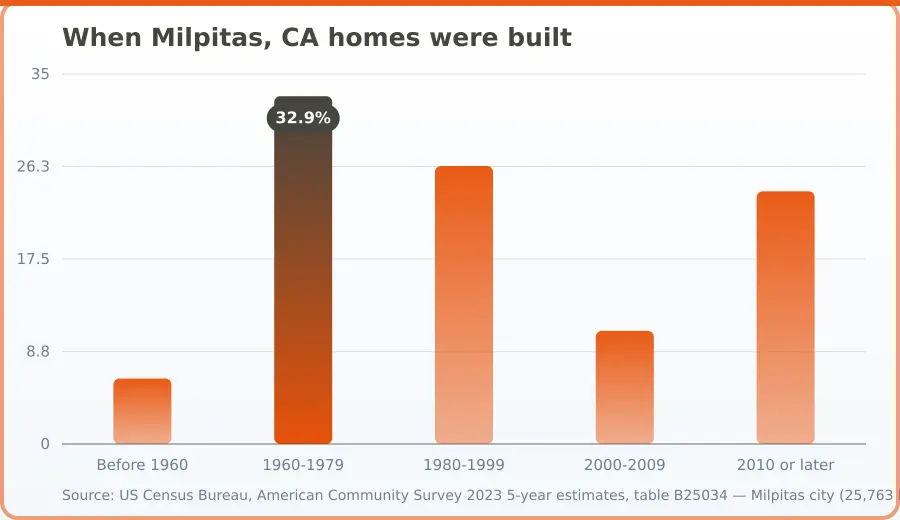
| Period | When homes were built (%) |
|---|---|
| Before 1960 | 6.2 |
| 1960-1979 | 32.9 |
| 1980-1999 | 26.3 |
| 2000-2009 | 10.7 |
| 2010 or later | 23.9 |
Source: US Census Bureau, American Community Survey 2023 5-year estimates, table B25034 — Milpitas city (25,763 housing units). Retrieved November 10, 2026.
Samsung Washer Repair FAQ — Milpitas, CA
Samsung Washer Repair addresses issues like drum problems, water inlet valve faults, drainage blockages, control board errors, and seal leaks. A technician will diagnose the fault, identify whether parts need replacement or adjustment, and perform the necessary work. The scope depends on your specific model and the nature of the malfunction.
Milpitas Appliance Repair Pros connects you with independent local providers who typically respond promptly to service requests in the Milpitas area. Response times vary by provider availability and current workload, but local technicians can often schedule appointments within a few days. Contact the provider directly to confirm their availability for your situation.
Samsung Washer Repair pricing depends on the specific problem, replacement parts needed, labor time, and your machine's model and age. Diagnostic fees, parts availability, and the complexity of the repair all influence the final cost. The independent provider will discuss pricing details with you before proceeding with work.
Before the technician arrives, clear the area around your Samsung washer for easy access. Have your washer model number ready—you can find it on the nameplate inside the door or on the back. Note any error codes or unusual sounds you've observed. Ensure water shutoff valves are accessible if the repair involves water connections.
Regular maintenance helps extend your washer's life. Use the correct detergent amount for your water hardness and load size. Clean the rubber gasket and detergent dispenser regularly to prevent mold and buildup. Don't overload the drum, and leave the door open after each cycle to allow moisture to dry. These habits reduce strain on internal components.
Yes. The Milpitas area's moderately hard water can cause mineral buildup inside your Samsung washer over time, affecting performance and accelerating wear on inlet valves and seals. Running periodic cleaning cycles and using appropriate detergent formulations helps minimize this impact. If your washer shows reduced water flow or has been serviced for mineral deposits before, discuss water hardness with your repair provider.
More Repairs for This Brand
Homeowner Safety Toolkit
Verify Your Milpitas, CA Appliance Repair Company
Before you hire anyone, use these independent national resources to confirm credentials, standards, and track record.
CPSC
Check whether your specific appliance has an open safety recall before paying for a repair — some recalls cover the fix or a replacement for free.
Check for RecallsNFPA
A poorly repaired dryer, range, or water heater is a real fire risk. The National Fire Protection Association's home safety guidance covers what to check after any appliance service.
Appliance Fire Safety TipsBBB
Look up any appliance repair company's complaint history, customer reviews, and accreditation status — a free, independent check before you hire.
Check StandingBook your Milpitas appliance repair today.
Call (408) 886-7712Our Milpitas, California Service Area
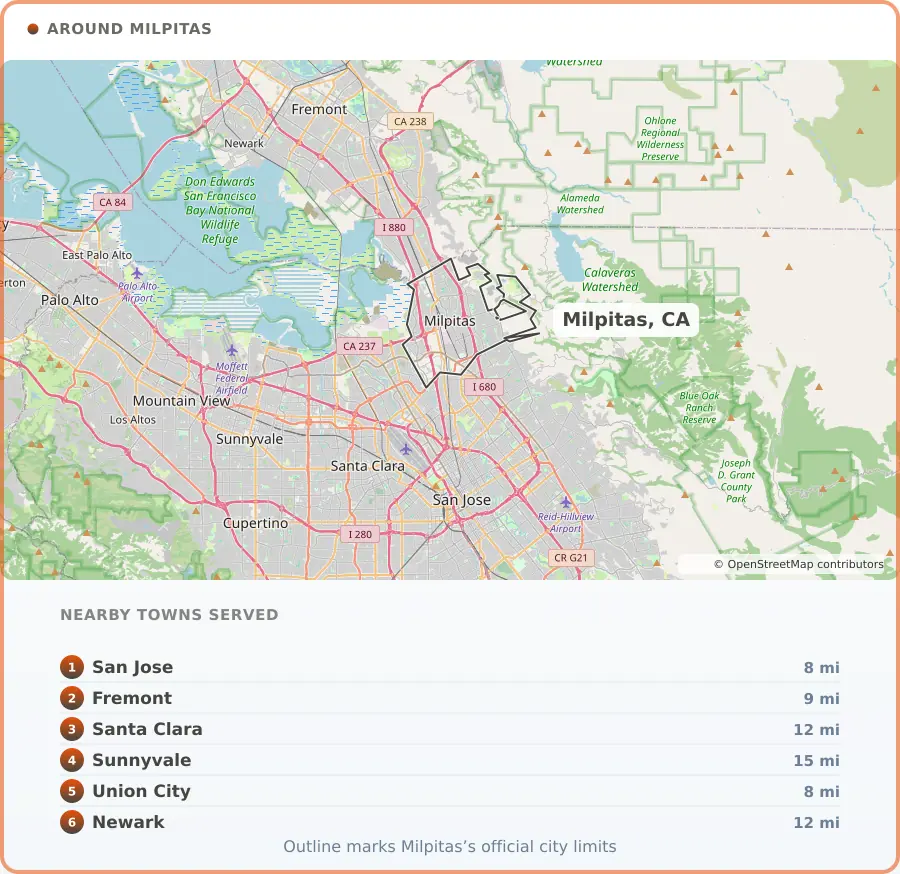
Coverage centres on Milpitas, CA and reaches 6 surrounding communities. Response time is what matters most in the hours after a problem is found, so knowing the ground is part of the job.
Milpitas, CA Information
Milpitas, CA sits right in the thick of Silicon Valley's semiconductor and electronics corridor, with easy access to Interstates 680 and 880 keeping goods and commuters moving through the Bay Area. The city's economic backbone runs from chip design and advanced manufacturing to logistics and clean-energy innovation, with companies like KLA, Western Digital, Analog Devices, and Flex Ltd. calling it home alongside major retail draws like the Great Mall.
Home to roughly 80,000 residents, Milpitas balances its industrial muscle with genuine neighborhood warmth, from the established streets of Sunnyhills to the newer mixed-use energy around McCarthy Ranch. It's a city shaped by steady growth and hard work, where tech campuses and family homes share the same zip code.
Photo: Dmitriy Grigoryev, CC BY-SA 3.0